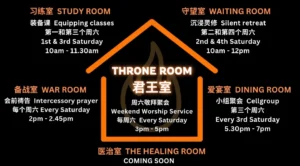
The Throne Room
- Reporting time: 12.00pm
- Ensure Worship slides, Announcement slides, and Preacher slides are formatted and ready for the service.
- Rehearsal with worship team to understand the flow of worship.
- Be attentive to the speaker, and help to click and slide when required.
- Once in a while, check that the prompter TV is functioning well.
The Throne Room
- Reporting time: 11.45am
- Sound checks by 11.45am to be ready for 12.30pm worship rehearsal.
- Assist Worship team to fine tune the sound.
- 1.55pm Get ready for The War Room.
- Stream The War Room on Youtube
- Manage the volume during The War Room
- Delete The War Room video after the session.
- 2.45pm get ready for sound check by Worship Team and Keyboardist playing soft music
- Stream The Throne Room on Youtube.
- Manage the sound and streaming camera during service
- Stop recording at ministering time.
- Upload the video to Youtube. Send link to Ministry Chat.
- Pack up : Refer to check list
- Place Ekklesia@Nineteen Moulmein Rise Sign Board out at the gate
- Prompter TV
- Everett Camera
- Ekklesia@Nineteen Moulmein Rise Pulpit
- Keyboard, Keyboard stand, Guitarist stand
- Projector & Keystone to be set
- Turn on white switch then house speaker switch in sequence
- Test all Wireless Mic
- Test keyboard sound
- Testing Guitar 1 sound
- Ensure house speaker, keyboard speakers and worship speakers are all working.
- Ensure all three screens are in correct display. Monitor & TV Prompter same screen, projector is extended screen.
- Before 12.oopm Prepare the Kid Room TV
to be updated
- Turn on OBS and Clicker computer
- Click OBS to start OBS
– > Click on [Admin login] for auto password login - Open Chrome, choose ACC account (minimise if required)
- OBS choose [Main Face] for alignment of OBS Camera
Position Zero – Tip of the top and right tip of the cross as reference.
Position 1 – To align with the base line of the platform,
– To align to the bottom of projector screen
– Lighthouse tip to the center of pulpit
Position 2 – Zoom in to just cover the wheel of the pulpit.
Position 3 – Keyboardist. Align right to tip of keyboard,
move down to capture leg of Keyboardist
Position 4 – Align to the base of the pulpit board
Tab Content
Morning Service – Waiting Room – 10.00am
To arrive by 9.15am and allow time for troubleshooting
1. Turn on white switch then house speaker switch in sequence
2. Test all Wireless Mic
3. Test keyboard sound
4. Testing Guitar 1 sound
5. Ensure house speaker, keyboard speakers and worship speakers are all working.
6. Ensure all three screens are in correct display. Monitor & TV Prompter same screen, projector is extended screen.
7. Get ready all wired Mic for Pray up
Worship Practice – 12.30pm to 1.30pm
1. Tune sound for worship vocal
2. Tune sound for Keyboard
3. Tune Sound for Guitar 1
4. Ensure all sound are in harmonise together.
5. Get ready wireless speaker set
War Room Pray up 2.00pm to 2.45pm
1. Ensure all wired Mic are functioning
2. Volume up Pray Leader
3. Lower/Mute supporting group members
Prepare for Throne Room
Soundboard
2.45pm – Keyboardist take position
– play background music (soft, not too loud)
– Worship vocal mic test (sitting, on chair ready)
OBS – Stream live but DELETED after Pray up ended
The Throne Room
3.00pm onwards
– Ensure volume and sound are harmonised
– OBS live stream
– OBS STOP RECORDING at MINISTERING TIME.
The Throne Room Video will be edited, in the Youtube, without the Worship and announcement. Only the sermon message video will be uploaded.
After Service is over, Pack up check list:
– Change to RCC Pulpit
– Shift Keyboard back to keep position
– Remove batteries from all mics and wireless transmitters.
– Keep projector
– Keep Prompt TV
– Keep Everett Camera
– Keep Guitars
– Keep all Wireless Mic (Wire Mic cables should have been kept after pray up)
– Push monitor table in
– Keep our Pulpit
– Keep “I am still here” Banner
– Kid’s room TV
– Keep Sowing Box x 4 (Admin Team)
– Off all power in sequence
– Off all aircon
– Off all lights
– Lock the Sanctuary door
– Keep Ekklesia@Nineteen Moulmein Rise Signboard in from the gate